Social Recruiting Made Simple
Publish Vacancies Directly on Corporate Social Accounts
Tap into the potential of your corporate social media presence with Hirebee. Effortlessly post vacancies on Facebook, LinkedIn, and Twitter, and manage applications directly from your dashboard.
Hirebee is a highly recommended global hiring solution
What Is Social Job Posting?
Hirebee's social job posting feature lets recruiting teams publish open positions directly to company social profiles — LinkedIn, Facebook, Twitter/X, and more — from within Hirebee, turning your company's social presence into a continuous recruitment channel without additional tools or manual effort.
Direct Social Profile Publishing
Connect your company's social accounts to Hirebee once via OAuth authentication. When publishing a role, select which social profiles to post to and Hirebee handles the rest — formatting the post appropriately for each platform, including the job title, key details, and a link back to your branded career page.
Scheduled & Timed Posting
Schedule social job posts for the times when your audience is most active — typically mid-morning on weekdays for LinkedIn, or evenings for Facebook. Timed posting ensures your content reaches maximum organic reach without requiring manual action at the right moment.
Employee Sharing Campaigns
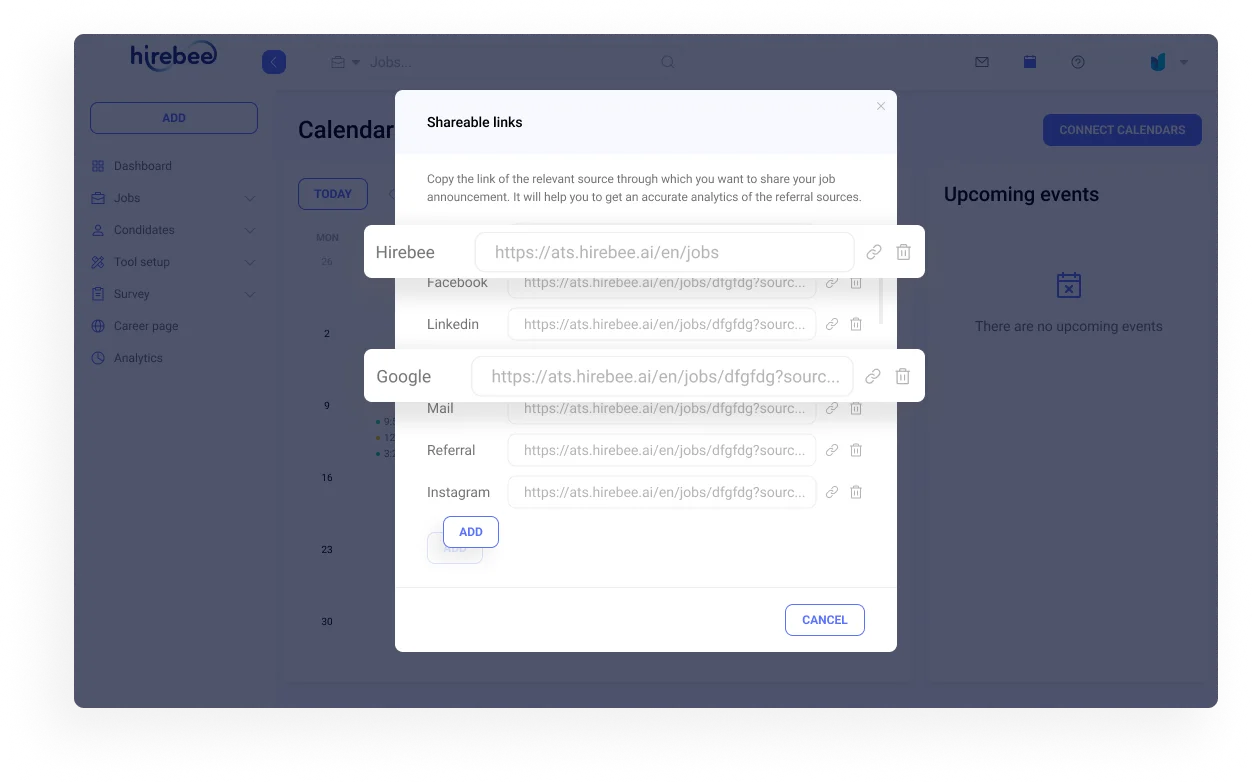
Generate shareable links for each job that employees can distribute to their personal networks with one click. Hirebee tracks which employee shares generate clicks and applications — enabling referral program management and recognition for employees whose networks contribute to successful hires.
How Social Job Posting Works in Hirebee
Social posts are created as part of the job publishing flow — no separate social media management tool is needed. Post performance data (impressions, clicks, applications) flows back to Hirebee's analytics, so social channels are measured alongside other sourcing channels in a unified reporting view.
Why Social Distribution Amplifies Hiring Reach
Your company's social followers are a warm audience who already know your brand. Posting jobs to social channels consistently keeps your employer brand top of mind with passive candidates, drives organic applications with low cost-per-applicant, and enables viral reach through employee sharing and social algorithms.
Complete Social Media Job Posting
LinkedIn Integration
Post directly to LinkedIn — the largest professional network with millions of professionals ready to engage with your vacancies.
Facebook Posting
Share job openings on your corporate Facebook page. Reach your existing followers and their networks.
Twitter/X Publishing
Post vacancies to your corporate Twitter account. Candidates clicking the link fill out your application form automatically.
Visual Studio
Create attractive, personalized visual templates for your social media job announcements. Job title and deadline auto-fill.
Custom Templates
Design announcement templates that match your employer brand. Job seekers will recognize your company instantly.
Social Analytics
Track which social platforms deliver the most applicants and optimize your social recruiting strategy.
Why Social Media Job Posting Matters
Major Platforms
Post to Facebook, LinkedIn, and Twitter directly from your Hirebee dashboard after creating a job.
Instant Sharing
Social sharing is built into the job posting process — never forget to promote your openings.
Applications Centralized
Candidates who click your social media link fill out your application form and are stored in your dashboard.
Employer Brand Boost
Personalized visual announcements develop your employer brand and help you stand out from competitors.
How Social Media Posting Works
Post Your Job on Hirebee
Create your job posting in Hirebee with all the details — title, description, requirements.
Create a Visual (Optional)
Use the built-in visual studio to create an eye-catching announcement template. Job details auto-fill.
Share to Social Platforms
Click the Facebook, LinkedIn, or Twitter button. You'll be taken to your logged-in account with the post ready to share.
Collect Applications
Candidates click your link, fill out the application form, and are automatically stored as applicants in your Hirebee dashboard.
Frequently Asked Questions
Common questions about Publish Vacancies on Social Accounts.
You can post vacancies directly to Facebook, LinkedIn, and Twitter (X) from your Hirebee dashboard.
Candidates clicking your social media link are taken to your application form. They fill it out and are automatically stored as applicants in your system.
Hirebee's built-in visual studio lets you create attractive templates for your social media job announcements. Job title, deadline, and other details are automatically added to the template.
Social sharing is integrated into the job posting process. After creating a job, you'll see buttons for Facebook, LinkedIn, and Twitter that take you to your logged-in account with the post ready to share.

Ready to see it in action?
Join 1,000+ companies using Hirebee. Start your free trial — no credit card required.