Offline & External Sourcing
Adding Candidate Resumes Manually
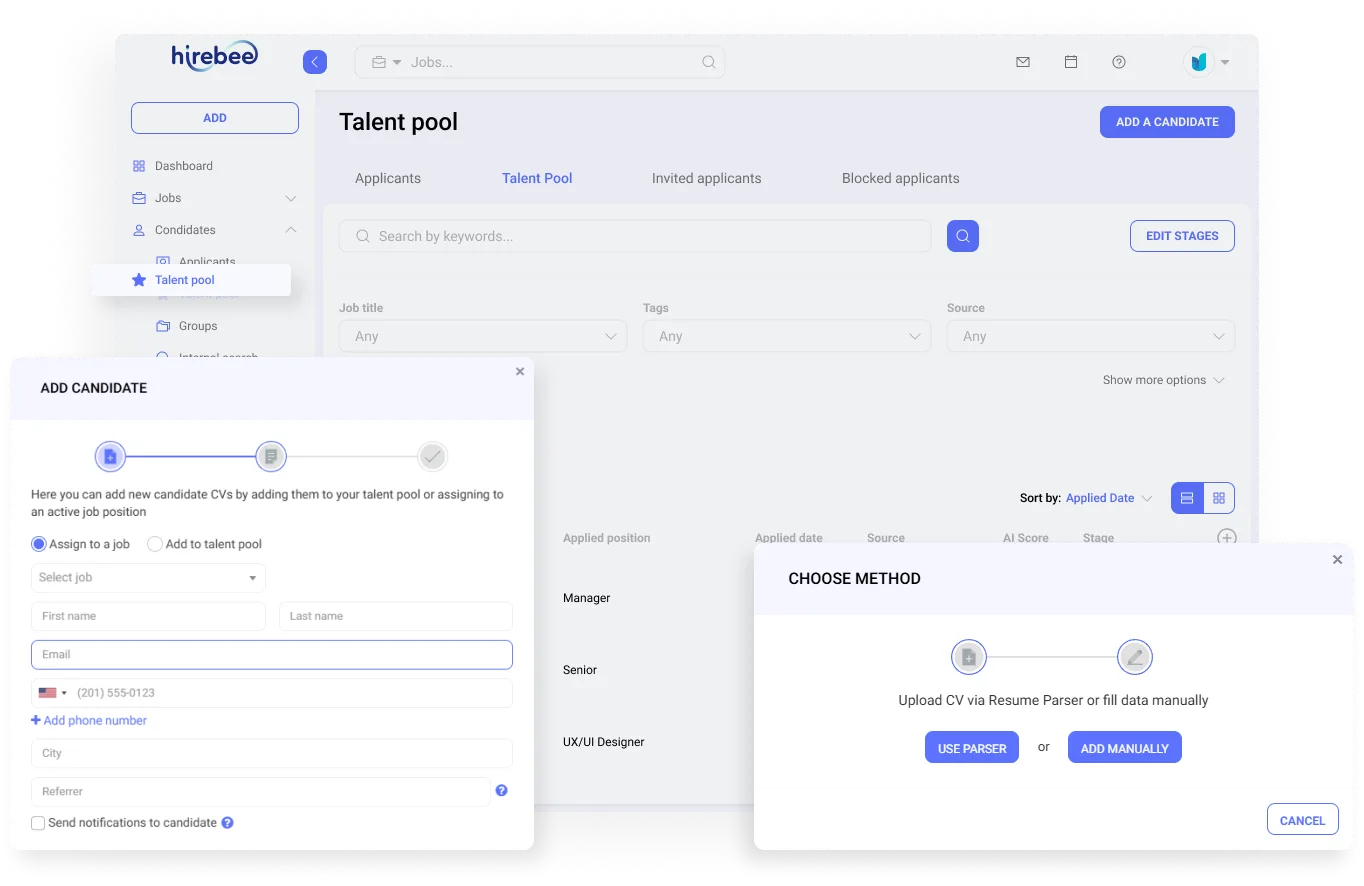
Hirebee isn't only perfect for your online recruiting needs — it can also be used for your offline recruitment. Add candidate resumes from external sources, parse them, and save to your candidate pool or assign to open positions.
Hirebee is a highly recommended global hiring solution
What Is Manual Resume Import?
Hirebee's manual resume import lets recruiting teams quickly add candidates who come through offline channels — employee referrals, networking events, direct outreach, or physical applications — by uploading files or pasting resume text, with AI parsing doing the heavy lifting automatically.
Drag-and-Drop Resume Upload
Upload individual resumes or batches of PDF, Word, and plain-text files in one action. Hirebee's AI parser extracts structured data instantly — name, contact details, work history, education, and skills — creating complete candidate profiles without manual data entry. Parsing accuracy exceeds 95% across common resume formats.
LinkedIn Profile Import
Paste a LinkedIn profile URL or use the Hirebee Chrome extension to capture a candidate's LinkedIn data directly into a new profile. Contact details, work history, and skills are imported and structured automatically, creating a searchable record linked to the source URL.
Batch Import for High-Volume Events
After career fairs, campus recruiting events, or referral campaigns, import a batch of resumes at once — Hirebee processes each file, creates individual profiles, and adds candidates to the appropriate talent pool or job pipeline. Bulk tagging applies sourcing labels to the entire batch in one action.
How Manual Import Works in Hirebee
Imported candidates land in your Hirebee database with full profile data and an import source tag. From there, they can be added to active pipelines, tagged for future roles, or enrolled in nurture sequences — all standard Hirebee workflows apply to manually imported candidates identically to sourced or applied candidates.
Why Teams Choose Hirebee for Resume Management
Many of the best hires come through referrals and direct relationships — Hirebee ensures these candidates receive the same structured process, documentation, and tracking as applicants from any other channel, keeping your recruiting operation organized regardless of how candidates enter your pipeline.
Manual Resume Management
Resume Upload
Upload candidate resumes from any external source. Our parser extracts key data automatically.
AI Scoring
AI analyzes work experience, skills, and qualifications against job requirements to rank candidates by relevance.
Profile Creation
Create functional candidate profiles with name, email, phone, location, source, and CV data.
Assign to Jobs
Add candidates as job applicants or passive candidates in your talent pool — your choice.
Employee Referrals
Perfect for managing internal employee referrals. Add referred candidates quickly and track their source.
Agency Integration
Works with external recruitment agencies. They can add sourced candidates directly into your Hirebee dashboard.
How Manual Resume Upload Works
Upload Resume
Upload a candidate's CV or resume file. Our parser extracts work experience, skills, and personal data.
Complete Profile
Add or edit fields undetected by the parser — name, email, phone, location, and source.
AI Scoring
The AI evaluates the candidate's skills and experience against job requirements and assigns a relevance ranking.
Add to Pipeline
Save the candidate to your talent pool or assign them directly to an open job position.
Frequently Asked Questions
Common questions about Adding Candidate Resumes Manually.
Yes. Hirebee supports offline recruitment. You can manually add candidates sourced from events, referrals, walk-ins, or any external source.
Our resume parser extracts key information from uploaded CVs including work experience, skills, and personal data. Fields not detected by the parser can be manually edited.
AI scoring analyzes the candidate's CV against job requirements to determine relevance. The score is displayed on the candidate's profile and can be used to sort candidates by relevance.
Yes. With Hirebee's flexible user access structure, you can create custom roles for external recruitment agencies who can add sourced candidates directly into your dashboard.

Ready to see it in action?
Join 1,000+ companies using Hirebee. Start your free trial — no credit card required.